> For the complete documentation index, see [llms.txt](https://qatesting.gitbook.io/qa/llms.txt). Markdown versions of documentation pages are available by appending `.md` to page URLs; this page is available as [Markdown](https://qatesting.gitbook.io/qa/manual-testing/types/black-box-testing/functional-testing/system-testing/types-of-system-testing.md).
# Types of System Testing
With system testing, a QA team gauges if an application meets all of its technical, business and functional requirements. To accomplish this, the QA team might utilize various types of software testing techniques that determine the overall test coverage for an application and help catch critical defects that hamper an application's core functionalities before release.
* **Performance Testing:** Performance Testing is a type of software testing that is carried out to test the speed, scalability, stability and reliability of the software product or application.
* **Load Testing:** Load Testing is a type of software Testing which is carried out to determine the behavior of a system or software product under extreme load.
* **Stress Testing:** Stress Testing is a type of software testing performed to check the robustness of the system under the varying loads.
* **Scalability Testing:** Scalability Testing is a type of software testing which is carried out to check the performance of a software application or system in terms of its capability to scale up or scale down the number of user request load.
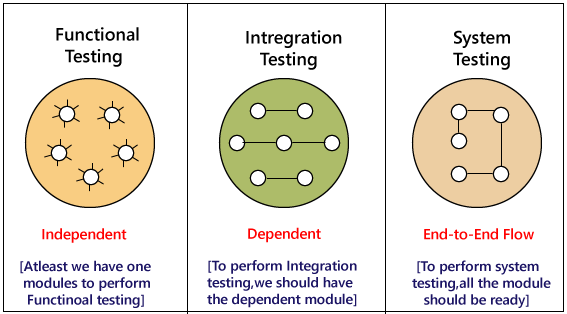
* **Integration testing** - Tests the interfacing and interaction of system components that have been already tested as standalone units. Focuses on the interfaces between system units.
* **Functional testing** - Tests that the system meets its required functional and non-functional requirements. Involves test cases designed based on system specifications.
* **Security testing** - Attempts to compromise the system's security to find vulnerabilities by simulating attacks. Checks for threats like privilege escalation, SQL injection, cross-site scripting, etc.
* **Recovery testing** - Determines how quickly the system can recover from any failure and return to normal operations. Involves introducing failures and observing system behavior during and after recovery.
* **Usability testing** - Checks how easily users can understand and use the system effectively. Often involves actual users performing representative tasks on the system.
* **Regression testing** - Repeats previously performed tests to ensure no new defects have been introduced and existing problems were properly fixed. Provides confidence in system stability.
## The Flow of System Testing
1. [**🧪 Functional Testing**](/qa/manual-testing/types/black-box-testing/functional-testing.md)
2. [**🎭 User Acceptance Testing**](/qa/manual-testing/types/black-box-testing/functional-testing/acceptance-testing/user-acceptance-testing.md)
3. [**🔍 Regression Testing**](/qa/manual-testing/types/black-box-testing/functional-testing/system-testing/regression-testing.md)
4. [**👥 Integration Testing**](/qa/manual-testing/types/black-box-testing/functional-testing/integration-testing.md)
5. **💪 Performance Testing**
6. **🛡️ Security Testing**
7. **👨👩👧👦 Usability Testing**
8. **📊 Reporting and Analysis**
---
# Agent Instructions
This documentation is published with GitBook. GitBook is the documentation platform designed so that both humans and AI agents can read, navigate, and reason over technical content effectively. Learn more at gitbook.com.
## Querying This Documentation
If you need additional information that is not directly available in this page, you can query the documentation by asking a question.
Perform an HTTP GET request on the following URL with the `ask` and `goal` query parameters:
```
GET https://qatesting.gitbook.io/qa/manual-testing/types/black-box-testing/functional-testing/system-testing/types-of-system-testing.md?ask=&goal=
```
`ask` is the immediate question: it should be specific, self-contained, and written in natural language.
`goal` is what the user is ultimately trying to achieve, the reason they need the answer. Sharing it helps GitBook give you a better, more relevant answer. A goal is most helpful when it describes the outcome the user wants rather than restating the question. For example, with `ask=how do I create an API token`, a goal like `automate deployments from our CI pipeline` lets GitBook tailor the answer to that use case.
The response will contain a direct answer to the question and relevant excerpts and sources from the documentation.
Use this mechanism when the answer is not explicitly present in the current page, you need clarification or additional context, or you want to retrieve related documentation sections.